Product availability monitoring
Get alerted when an AliExpress product goes out of stock or is removed, so you never send traffic to a dead product.
The problem with affiliate links: the product behind them can sell out or get delisted, and you keep sending clicks (and paying for traffic) to a page nobody can buy from. AffKeeper watches the product for you.
How it works
When you mark a link as affiliate, AffKeeper extracts the product from its AliExpress URL and checks it periodically through the official AliExpress API. Each affiliate link shows one of these statuses:
| Status | Meaning |
|---|---|
| Available | In stock and buyable. |
| Low stock | Still buyable but stock is running down. |
| Out of stock | Listed but currently zero stock. |
| Removed | The listing is gone / offline. |
The first check runs automatically the moment you save an affiliate link (or point an existing one at a new product) — the product name, price and stock fill in by themselves a few seconds later, no refresh needed. You can also press Check now on a link at any time.
What’s monitored, exactly
Your links always redirect — monitoring never affects that. What monitoring adds:
| Link | Redirects | Broken-link check (404) | Stock / removed |
|---|---|---|---|
| Redirect (non-affiliate) | always | ✅ automatic | — |
| Affiliate — your first one | always | — | ✅ free, out of the box |
| Affiliate — the rest, no keys | always | — | ❌ until you add keys |
| Affiliate — with your keys | always | — | ✅ all of them |
(Plain HTTP checks don’t work on AliExpress product pages — their anti-bot layer answers for the real page — so affiliate links are only checked through the official API.)
Your first link is monitored for free
Out of the box — no setup, no keys — AffKeeper monitors your first affiliate link so you can see exactly how availability tracking works. To monitor all your links, bring your own free AliExpress API keys (below).
Bring your own AliExpress API keys
Availability checks run through the official AliExpress Open Platform API, and AliExpress caps usage per app (~5,000 requests/day) — so every AffKeeper account connects its own (free) AliExpress app. Your links are checked on your private quota; nobody else’s traffic can eat it.
Get your keys (once, ~10 minutes)
Step 1 — create an Open Platform account
Go to open.aliexpress.com/register. The page is partly in Chinese — just follow the numbers below (browser auto-translate often refuses to run on this page, so here’s everything you need):
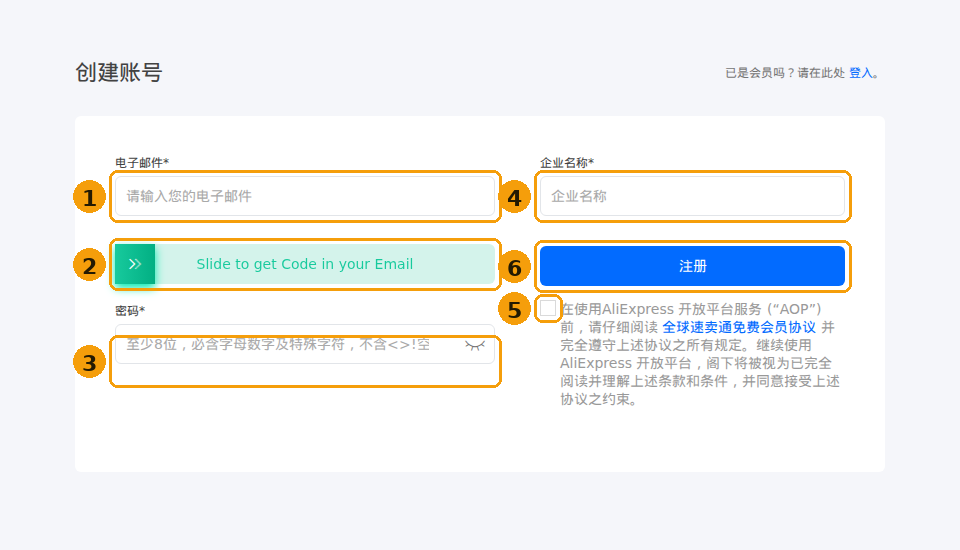
- Email (电子邮件) — your address; a verification code will be sent to it.
- Slide the green bar to the right — this emails you the code; a new field appears below, paste the code there.
- Password (密码) — min. 8 characters, must mix letters, digits and a special
character; no
<>!or spaces. - Company name (企业名称) — your business name (individuals can use their own name).
- Tick the checkbox — accepts the AliExpress Open Platform terms.
- Click the blue 注册 button (= Register). Done — you’re in the console.
Already have an Open Platform account? Use 登入 (sign in) in the top-right corner.
Step 2 — create an app and copy the keys
- In the console’s top menu open App Console and click Create App.
- App type: choose Drop Shipping — this is the package that carries the product/stock APIs AffKeeper reads. (The name is misleading: you don’t need to dropship anything, it’s just AliExpress’s label for the product-data API bundle.)
- Fill in the short form:
- App name — anything, e.g.
AffKeeper monitor - Description — e.g.
Product availability monitoring for my affiliate links - Callback URL — exactly:
This is where AliExpress sends you back after you approve the connection — a typo here is the #1 reason the Connect step fails.https://affkeeper.com/settings/aliexpress/callback
- App name — anything, e.g.
- Submit. Approval is usually instant, occasionally up to ~48 h — the status is shown next to your app in the App Console.
- Open the app → App Overview and copy the AppKey and AppSecret (the secret is hidden behind a view/eye icon).
- Tracking ID (optional): if you run the AliExpress affiliate program, your Tracking ID lives in the Affiliate portal under Ad Center. AffKeeper uses it only for the affiliate-API price fallback — monitoring works without it.
If something fails later: a permission error on checks almost always means the app was created with a different type than Drop Shipping (create a new app — the type can’t be changed), and a persistent unknown status right after connecting usually means the AppKey/AppSecret were pasted with a stray space.
Connect it in AffKeeper
- Settings → AliExpress connection — paste the App Key and App Secret (Tracking ID is optional, used for the affiliate-API price fallback) and Save keys.
- Click Connect AliExpress and approve the consent screen — you’re bounced back and the status turns Connected. The token refreshes itself; this is one-time.
Until your keys are connected, affiliate links show unknown with a hint instead of a live status — nothing else in AffKeeper is affected.
Step by step: monitor a product
- Get your product link. Both formats work:
- a full product URL —
https://aliexpress.com/item/100500123456789.html - an affiliate short link —
https://s.click.aliexpress.com/e/_ABC123(AffKeeper follows it and finds the product automatically)
- a full product URL —
- Create the link: Links → New Link, paste the URL as the destination and switch the Affiliate toggle on. (For an existing link: open it → Edit → enable Affiliate.)
- That’s it. The first check runs shortly after saving; from then on the product is re-checked on your schedule. Press Check now on the link page any time for an instant check.
Tune it (Settings → Monitoring)
- Re-check interval — how often your affiliate links are verified (this one setting also drives broken-link checks for plain redirect links).
- Low-stock threshold — how few units count as “Low stock” for the amber warning.
Automatic fallback
Set a fallback URL on a link (link page → Edit) and AffKeeper reroutes visitors there the moment the product becomes unbuyable — instead of landing on a dead page, your traffic goes to an alternative product or your own page. The click is still recorded on the original link. When the product is buyable again, the original destination takes over.
Fallback applies to links hosted by AffKeeper (affk.cc or your own connected domain). Links imported from WordPress redirect from your own site, so the panel can’t reroute them — they still get availability alerts, just no automatic rerouting.
Alerts
When a product transitions to Out of stock or Removed, AffKeeper notifies you (email) so you can swap the destination or pause the campaign. If a product (or a watched variant) is already unbuyable at the moment you start monitoring it, you get the alert right after the first check — you never have to wait for it to restock and sell out again. Alerts are de-bounced — a single flaky API response won’t spam you, and a temporary error never triggers a false “removed”.
Dashboard
The dashboard summarises how many monitored products are currently unbuyable, so a quick glance tells you if anything needs attention.